Apply for your Armenia eVisa in four straightforward steps at evisa.mfa.am: complete the online form, upload your passport scan and photograph, pay the fee by card, and receive approval by email within three working days. This guide walks through every stage of the Armenia eVisa application process so you can submit a complete, error-free request on your first attempt.
Before You Start: What You Need
Prepare all required materials before opening the application portal. Having documents ready prevents timeouts and repeated entries, which are among the most common reasons applicants abandon the process midway.
Required documents and items:
- A valid passport with at least six months of remaining validity from your planned entry date
- A recent digital passport photograph (white background, clear face, no glasses)
- A debit or credit card (Visa or Mastercard) for fee payment
- A working email address to receive the approved eVisa
- Your intended travel dates and accommodation address in Armenia
Review the full Armenia visa requirements before starting to confirm your nationality is eligible for the eVisa program.
Photo Specifications
The photograph you upload must meet Armenian immigration standards. Submit a recent color photo taken within the last six months. The background must be plain white or light gray. Your face should be clearly visible, centered, and occupying approximately 70-80% of the frame. Wear normal clothing; uniforms or head coverings for religious purposes are acceptable. Do not wear tinted glasses. The photo resolution should be at least 600×600 pixels.
Accepted File Formats
The evisa.mfa.am portal accepts files in JPEG, PNG, and PDF formats. Each file must not exceed 3 MB in size. If your scan exceeds this limit, reduce the resolution or use a free online compression tool before uploading. Passport scans should be in color, showing the full bio page with all text legible.
Step 1: Fill the Application Form
Navigate to evisa.mfa.am and select “Apply for eVisa” to begin. The application form collects personal details, passport information, and travel plans across three main sections.
Personal information section: Enter your full name exactly as it appears on your passport, including middle names if applicable. Provide your date of birth, nationality, gender, and current residential address. Double-check every field against your passport – even minor spelling differences between your application and passport can cause delays or rejection.
Passport details section: Enter your passport number, issue date, and expiry date. The system automatically validates that your passport has at least six months of remaining validity. If your passport expires within six months of your intended travel date, renew it before applying.
Travel information section: Select your visa type – either a 21-day single-entry eVisa or a 120-day single-entry eVisa. Enter your planned entry date, the purpose of visit, and your accommodation address in Armenia. If you have not booked accommodation yet, provide the name and address of a hotel you plan to stay at.
After completing all fields, review the entire form before proceeding. The portal does not allow edits once you advance to the next step.
Step 2: Upload Your Documents
The upload step requires two files: a scan of your passport bio page and your passport-style photograph.
Passport Scan Requirements
Upload a clear, color scan of the page containing your photo, name, passport number, and expiry date. The entire page must be visible with no cropping. Blurry, dark, or partial scans are the number one reason for application delays. Use a scanner or a smartphone scanning app rather than taking a casual photo.
Photo Upload Tips
Upload the photograph separately from the passport scan. The system validates photo dimensions and background color automatically. If the upload fails, check that your file meets the size (under 3 MB) and format (JPEG or PNG) requirements. Avoid uploading images with watermarks, timestamps, or editing overlays.
If you encounter errors during upload, try switching browsers. The portal works best with Google Chrome and Mozilla Firefox. Clear your browser cache if uploads stall repeatedly.
Step 3: Pay the Application Fee
After uploading, the portal displays the total fee based on your selected visa type:
| Visa Type | Duration | Fee (AMD) | Fee (USD approx.) |
|---|---|---|---|
| Short-stay eVisa | 21 days, single entry | AMD 3,000 | ~$8 |
| Long-stay eVisa | 120 days, single entry | AMD 15,000 | ~$38 |
Accepted Payment Methods
The portal accepts Visa and Mastercard debit and credit cards. Payment is processed in Armenian Dram (AMD), and your bank applies its own exchange rate. Some banks may charge a small foreign transaction fee.
Payment Troubleshooting
If your payment fails, verify that your card is enabled for international transactions. Contact your bank to authorize the payment if it was flagged as suspicious. Try a different card if one continues to fail. The portal does not accept prepaid cards, American Express, or digital wallets like PayPal.
For a full breakdown of all Armenia visa costs including additional fees, see our Armenia eVisa cost guide.
Step 4: Receive Your eVisa
After successful payment, your application enters the processing queue. Standard processing takes up to three working days, though many applicants receive approval within 24 hours. For more details on processing timelines, see our Armenia visa processing time guide.
Approval Email
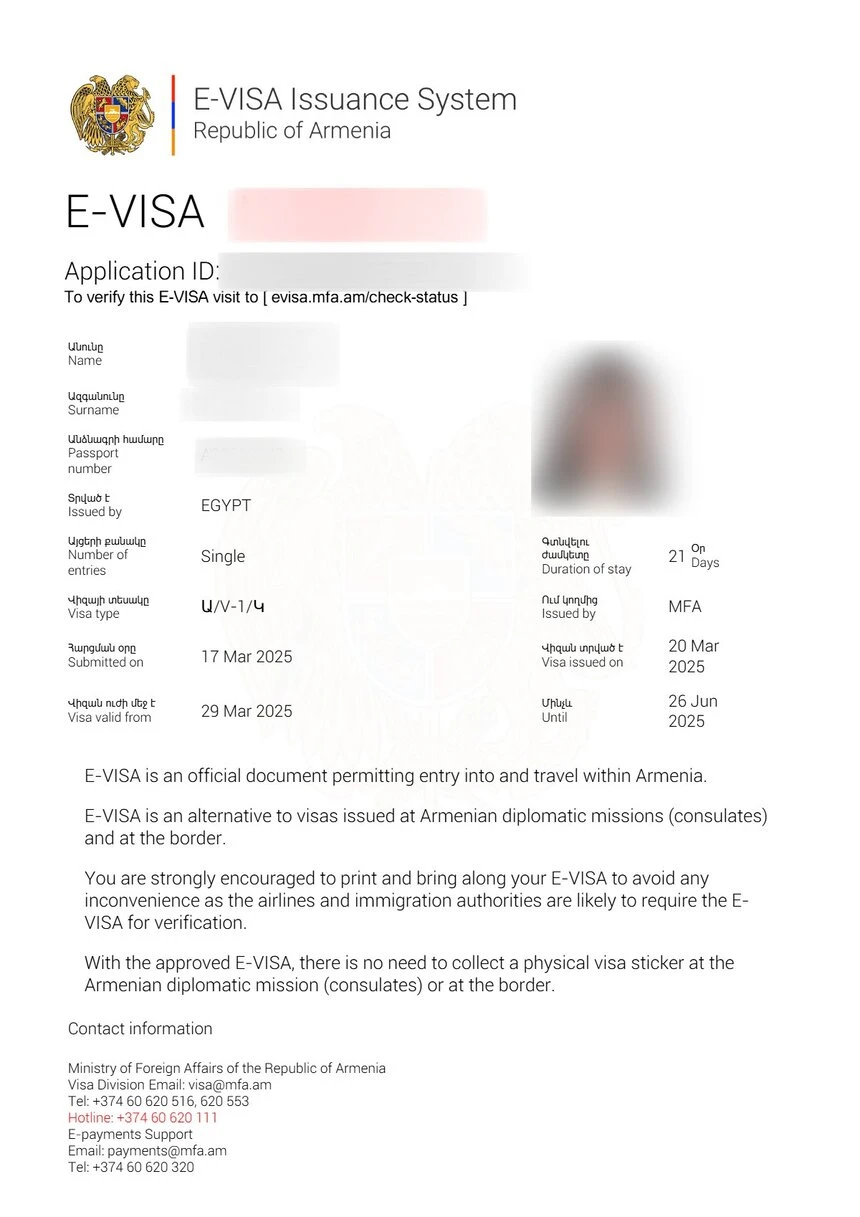
The approved eVisa arrives as a PDF attachment in the email address you provided during registration. Check your spam or junk folder if you do not see it within three days. The email comes from the official evisa.mfa.am domain.
What to Print
Print the eVisa PDF and carry it with your passport when traveling. Border control officers at Armenian airports and land crossings will verify the printed eVisa alongside your passport. Save a digital copy on your phone as a backup.
Checking Your Application Status
Track your application status at any time through the evisa.mfa.am portal. Select “Check Status” and enter your application reference number and passport number. The system displays one of three statuses: Submitted (under review), Approved (eVisa issued), or Rejected (see below).
If your status remains “Submitted” beyond three working days, contact the Armenian Ministry of Foreign Affairs support team through the portal’s contact form.
Common Application Mistakes to Avoid
Understanding frequent errors helps you submit a successful application the first time. Based on analysis of rejected applications, these are the most common pitfalls:
- Mismatched names: Your application name must match your passport exactly. Using a nickname or omitting a middle name causes rejection.
- Expired or near-expiry passport: The six-month validity rule is strictly enforced. No exceptions are made.
- Poor quality scans: Blurry, cropped, or dark passport scans are automatically flagged. Use a proper scanner.
- Incorrect visa type selection: Choosing 21 days when you need 120 days cannot be corrected after submission. Select carefully.
- Wrong email address: A typo in your email means you will never receive the approved eVisa. Double-check before submitting.
- Late application: Apply at least one to two weeks before your travel date to allow for processing time and any required corrections.
What If Your Application Is Rejected?
A rejected application does not mean you cannot visit Armenia. Rejection reasons are communicated by email and typically include document quality issues, passport validity concerns, or incomplete information. You may reapply immediately with corrected documents. The application fee for a rejected submission is not refunded, so ensure accuracy before paying.
If you believe the rejection was in error, contact the evisa.mfa.am support team with your application reference number and a clear explanation.
Frequently Asked Questions
How long does it take to get an Armenia eVisa?
Processing takes up to three working days. Most applicants receive approval within 24 to 48 hours.
Can I apply for an Armenia eVisa on behalf of someone else?
Yes, you can complete the application for another person, but you must use their passport details and a valid email address they can access.
What payment methods does evisa.mfa.am accept?
The portal accepts Visa and Mastercard debit and credit cards. American Express, PayPal, and bank transfers are not accepted.
Do I need to print my Armenia eVisa?
Yes, print the eVisa PDF and carry it with your passport. Border officers verify the printed document at entry points.
Can I extend my Armenia eVisa after arrival?
The eVisa itself cannot be extended. If you need to stay longer, visit the Passport and Visa Department in Yerevan to apply for an extension or different visa category.
What happens if my passport expires before my eVisa?
Your passport must be valid for at least six months beyond your planned entry date. If your passport expires, your eVisa becomes invalid and you must reapply with a new passport.
Is the Armenia eVisa a single-entry or multiple-entry visa?
The standard eVisa is single-entry. If you leave Armenia and wish to re-enter, you need a new eVisa or a multiple-entry visa from an embassy.
Can I change my travel dates after submitting the application?
No, travel dates cannot be changed after submission. If your dates change significantly, you may need to reapply.
Why was my payment declined on evisa.mfa.am?
Common reasons include international transaction restrictions on your card, insufficient funds, or bank security blocks. Contact your bank to authorize the transaction or try a different card.
How do I check if my nationality requires a visa for Armenia?
Check the eligibility list on evisa.mfa.am or review our Armenia eVisa overview for country-specific requirements.
Last updated: July 2026. Information based on the official evisa.mfa.am portal. Always verify current requirements before applying, as policies may change without notice.